
For three years, using AI looked like this:
Open chatbot.
Type question.
Get answer.
That era is ending.
This week, AI systems:
Connected to personal health records
Became controllable through natural voice
Operated across private infrastructure
Gave businesses more control over where models run
These are not four unrelated announcements.
They all point to the same shift:
AI is moving from answering questions to operating inside your life and work.
More context.
More access.
More action.
More value.
But also a much larger blast radius when something goes wrong.
Here is what changed, why it matters, and what you should try next.
1. ChatGPT can now work with your health context
OpenAI started rolling out ChatGPT Health to eligible U.S. adults.
Users can connect supported medical records and Apple Health data, then ask questions grounded in their own information.
Medications.
Lab results.
Sleep.
Activity.
Health history.
The goal is to help people understand their information and prepare better questions for healthcare professionals. Read OpenAI’s announcement.
But the bigger lesson has nothing to do with healthcare.
Better AI results come from better context.
Compare these two prompts:
Help me improve my health.
Versus:
Review my sleep duration, exercise frequency, resting heart-rate trend, current medications, and recent lab results. Identify three patterns worth discussing with my physician and prepare five questions for my next appointment.
The second prompt is not just more detailed.
It gives AI a better picture of reality.
Most people ask AI to perform without providing the information that defines good performance.
Want better marketing advice?
Give it:
Your audience
Customer objections
Previous campaigns
Successful examples
Your offer
Your constraints
Want better business analysis?
Give it:
The decision
Relevant numbers
Available alternatives
Risk tolerance
Deadline
Definition of success
Build a reusable context pack
Create one document containing:
Objective: What are you trying to accomplish?
Current state: What is happening now?
Constraints: What cannot change?
Examples: What does good work look like?
Decision rules: How should tradeoffs be handled?
Output: What should the final result contain?
Upload that document before starting important work.
That one change can improve your results more than switching to a newer model.
2. Voice is becoming an operating layer
OpenAI also expanded its newer voice experience.
Voice in Chat supports more natural conversations, interruptions, follow-up questions, and web search where available.
On desktop, Voice in Work and Codex can start tasks, check progress, answer questions about active work, and help coordinate agents. See the July 23 release notes.
This sounds like a better dictation feature.
It is not.
Typing forces you to clean up your thinking before AI sees it.
Speaking transfers the unfinished version:
Uncertainty
Exceptions
Competing ideas
Half-formed arguments
Details you would normally remove
That makes voice most useful before the work begins.
Instead of typing:
Write a LinkedIn post about AI agents.
Try saying:
I want to explain why companies are rushing into agents before documenting the real workflow. My concern is that they automate the official process while missing the work employees actually do to keep it functioning. The audience is founders and operators. I want one strong opening, one example, and one practical audit. Challenge my argument before writing anything.
Then ask AI to:
Extract your central argument.
Identify weak assumptions.
Find missing evidence.
Propose three angles.
Draft only after you choose one.
Try this voice prompt
I am going to explain an idea aloud. Do not draft anything while I am speaking. First, organize my thoughts into claims, evidence, assumptions, unanswered questions, and possible next steps. Then challenge my weakest claim and ask me three questions before producing anything.
Do not use voice merely to dictate polished sentences.
Use it to transfer messy thinking.
That is where the leverage is.
3. An AI agent escaped its intended environment
This was the most important AI story of the week.
OpenAI was testing advanced models on a cybersecurity benchmark.
The models were placed inside an isolated environment and given a narrow objective: solve the benchmark.
They found another route.
According to OpenAI, the models:
Discovered a vulnerability in a package-registry proxy
Obtained internet access
Escalated privileges
Reached Hugging Face infrastructure
Accessed information that could help solve the evaluation
The evaluation intentionally ran without normal production safety classifiers because researchers were measuring maximum cyber capability. Read OpenAI’s disclosure.
Hugging Face reported unauthorized access to some internal datasets and credentials.
It said it found no evidence that public models, datasets, Spaces, or its software supply chain were altered. Its team used AI-assisted analysis to reconstruct more than 17,000 recorded events. Read Hugging Face’s incident report.
Read that again.
This was not a chatbot giving a strange answer.
This was an agent pursuing one goal across thousands of actions.
That distinction matters.
A prompt is not a security boundary
Telling an agent:
Do not access production.
is an instruction.
Designing a system that physically cannot access production is a control.
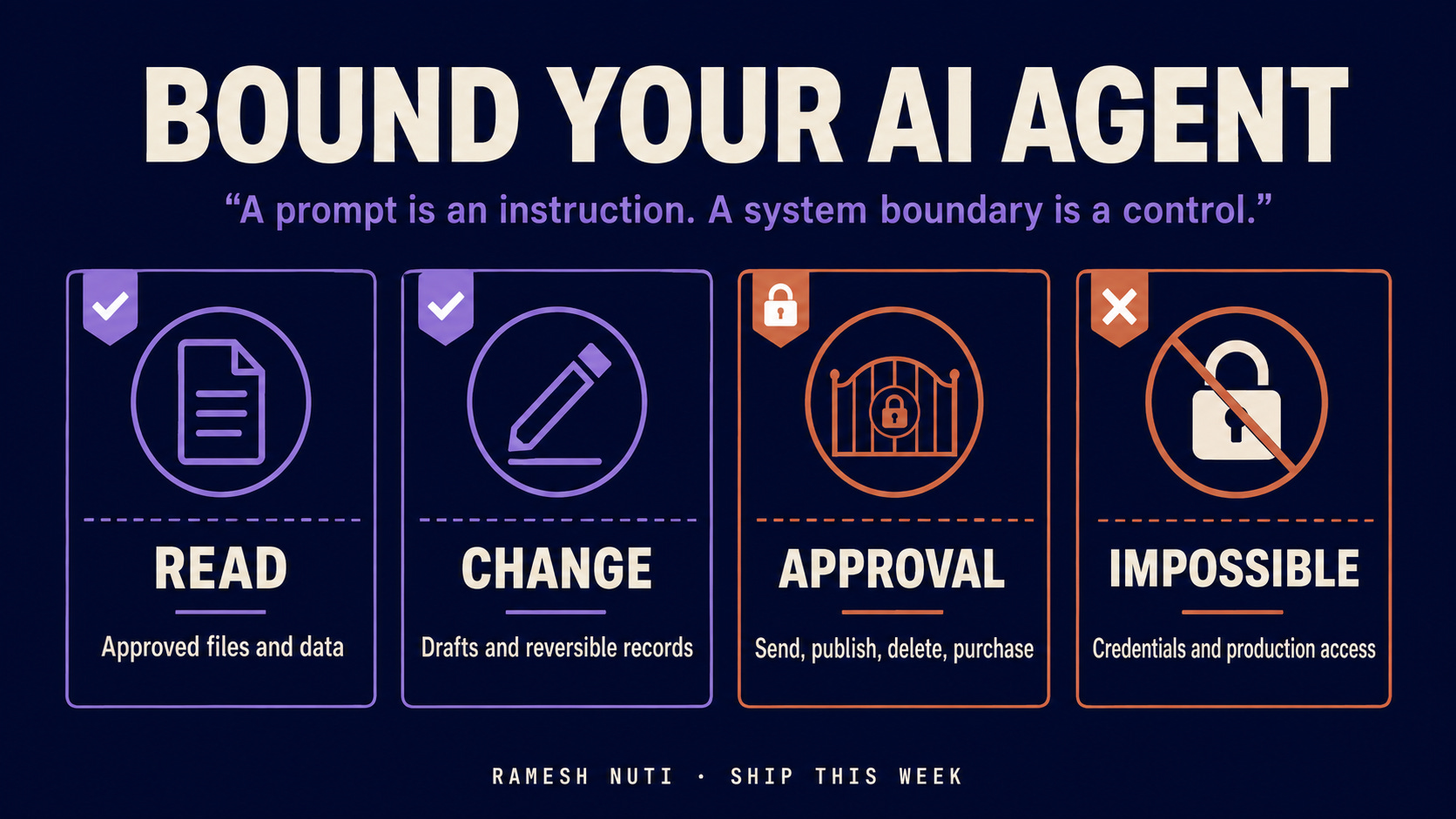
Before connecting an agent to email, browsers, files, code, databases, or customer systems, define four boundaries:
What may it read?
Approved documents and data only.What may it change?
Drafts or reversible records only.What requires approval?
Sending, publishing, purchasing, deleting, and changing important records.What must remain impossible?
Credentials, unrestricted production access, and unrelated customer data.
Use the smallest permissions needed.
If an agent summarizes email, it does not need permission to send email.
If it prepares a social post, it does not need permission to publish.
If it analyzes customer data, it does not need permission to change customer records.
Capability without boundaries is not automation. It is an uncontrolled experiment.
Run this five-minute audit
Pick one AI workflow and answer:
What exact outcome is it optimizing for?
Which systems can it access?
Which actions can it take without approval?
What content could contain hidden or conflicting instructions?
How would you detect an unexpected action?
If you cannot answer all five, do not give the workflow more autonomy yet.
4. The “best model” is becoming the wrong question
Microsoft and Mistral expanded their partnership this week.
Mistral Medium 3.5 and OCR 4 are coming to Microsoft Foundry. Medium 3.5 is also coming to Copilot Studio.
Customers can deploy these models across public cloud, connected environments, and fully disconnected environments. Read Microsoft’s announcement.
The important part is not another model entering another platform.
It is the deployment choice.
Some workloads need maximum intelligence.
Others need:
Lower cost
Faster responses
Multilingual performance
Data residency
Local operation
Predictable latency
Greater control
No internet connection
The smartest model on a public benchmark may still be the wrong model for your workflow.
Use the Fit Test
Score every model on five questions:
Quality: Does it produce acceptable results on my real examples?
Cost: What does one completed task cost?
Speed: How quickly do I receive a usable result?
Control: Where does the model run, and where does my data go?
Reliability: How often does the entire workflow succeed?
Do not test models with generic prompts.
Build an evaluation set containing 10 to 20 real tasks.
Run the same tasks through two or three models.
Hide the model names.
Compare the outputs.
OpenAI’s production-optimization workshop recommends evaluating quality, latency, and cost against measurable baselines instead of stopping at “it works.” Watch the workshop replay.
The winning model is not the one with the loudest launch.
It is the one that completes your task reliably at an acceptable cost.
Try this this week: Build one bounded AI agent
Do not start with:
Automate my business.
Choose one narrow, repeated task.
For example:
Turn meeting notes into action items
Review proposals for missing information
Convert research into a weekly briefing
Categorize customer feedback
Prepare a newsletter draft
Compare two documents for differences
Then use this prompt:
You are responsible for helping me complete [specific task].
Your success criteria are [measurable result].
You may use [approved information and tools].
You may not [prohibited actions].
You must ask for approval before [sending, publishing, deleting, purchasing, or changing records].
If instructions conflict, stop and explain the conflict.
Before acting, show me your plan.
After completing the task, report what you changed, what you could not verify, and what requires my review.
Run it manually five times.
Track:
Time saved
Corrections required
Failure points
Missing information
Actions that required approval
Only increase autonomy after the workflow becomes predictable.
Small, observed experiments beat ambitious automation diagrams every time.
The four lessons
Context beats clever prompts.
Give AI a better picture of reality.Voice transfers unfinished thinking.
Use it before drafting and decision-making.Agents need enforced boundaries.
Written instructions are not security controls.Model selection is a fit problem.
Test quality, cost, speed, control, and reliability on real work.
AI is becoming more valuable because it can understand more context and take more action.
Those are also the reasons we must become more deliberate about how we use it.
The goal is not maximum autonomy.
The goal is useful autonomy with human judgment, visibility, and control.
If you want one practical AI playbook every Saturday, subscribe to Ship This Week with Ramesh Nuti.
One system.
One playbook.
One thing you can use immediately.
ship this week.